TD5 Won’t Rev Past 3200 RPM: Common Causes and What to Check
At Empire Tuning, we would normally want to check fault codes and live data first before replacing parts or changing the map.
What does the 3200 rpm issue feel like?
Customers normally describe it in a few different ways.
Common symptoms include:
- The TD5 will not rev past around 3200 rpm
- The vehicle feels like it suddenly hits a limiter
- Power drops off under load
- The vehicle kangaroos or surges
- The engine warning light may come on
- The vehicle may go into limp mode
- It may feel worse when towing or going uphill
Sometimes the fault is there all the time. Other times it only happens when the engine is warm, under load or when the vehicle is being driven harder.
Do not assume it is the remap
If the vehicle has been remapped, it is easy to blame the map straight away.
Sometimes calibration can expose an existing weakness because components are now being asked to do more. But that does not automatically mean the map is the root cause.
A TD5 with a weak fuel pump, sticking wastegate, poor MAF reading, boost leak or sensor issue can feel fine at light throttle and then fall over when load increases.
This is why data matters!
Fuel delivery problems
Fuel delivery is one of the first areas we think about when a TD5 will not rev cleanly under load.
If the engine cannot get the fuel it needs, it can hesitate, cut back, surge or refuse to pull past a certain point, the td5 will not display any faults if this is the case
Possible fuel related causes can include:
- Weak fuel pump
- Blocked fuel filter
- Air in the fuel system
- Fuel pressure issues
- Injector related problems
- Poor wiring or connection faults
Changing random parts can get expensive quickly, so it is better to test and check what the vehicle is actually doing.
Boost control and overboost
Boost control is another common area to check.
If the turbo is making more boost than expected, or the ECU is seeing boost outside of the expected range, the vehicle can cut power to protect itself.
This can feel like the vehicle suddenly stops pulling or hits a wall.
Common boost related causes include:
- Sticking wastegate
- Incorrect wastegate adjustment
- Boost control solenoid issue
- Split or tired boost hoses
- Boost leaks
- Dirty or faulty MAP sensor
- Previous tuning that does not suit the vehicle
On modified TD5s, especially vehicles with hybrid turbos or unknown previous work, boost control needs to be checked properly.
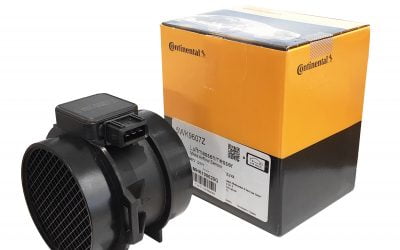
MAF sensor readings
The MAF sensor measures airflow into the engine.
If the MAF reading is poor, the vehicle may feel flat, smoky or inconsistent.
A bad MAF does not always give a clear fault code, so live data is useful.
If the MAF is not reading correctly, the vehicle may not behave as expected when load and rpm increase.
We have a separate guide on this here: Defender and Discovery TD5 MAF Logging with Nanocom.
You can also ce
MAP sensor issues
The MAP sensor helps the ECU understand boost pressure.
If the MAP sensor is dirty, blocked, faulty or reading incorrectly, the ECU may not be seeing the true boost pressure.
That can cause poor running, incorrect boost readings or protection strategies being triggered.
It is worth checking the sensor and the live data before assuming the turbo or map is at fault.
Throttle input and driver demand
The throttle pedal signal is also worth checking.
If the throttle signal is not clean, the vehicle can feel jerky or inconsistent.
This is not always the first suspect for a 3200 rpm issue, but it is part of the bigger picture when looking at live data.
Injector loom and oil contamination
TD5s are known for oil travelling through the injector loom and reaching the ECU plug.
This can cause all sorts of running issues, including misfires, poor running and strange drivability problems.
If there is oil in the red ECU plug, that needs to be dealt with properly.
It may not be the only issue, but it is something that should never be ignored.
Crank sensor and wiring faults
Crank sensor issues can also cause cutting out, loss of signal or strange running faults.
Sometimes the problem is not the sensor itself, but the wiring or connector condition.
If the vehicle cuts out, loses throttle response or randomly drops power, crank signal and related wiring should be considered as part of the diagnosis.
Why live data is the best starting point
The problem with this type of fault is that several issues can feel similar from the driver’s seat.
A fuel problem, overboost problem, airflow problem or sensor issue can all cause power loss under load.
That is why live data is so important.
With live data, we can look at what the vehicle is doing rather than guessing.
Useful information can include:
- Fault codes
- Boost pressure
- Airflow readings
- Throttle position
- Coolant temperature
- Injector balance where relevant
- When the fault happens
This gives a much clearer direction before spending money on parts.
Can Just Map It help diagnose this?
Yes, Just Map It can be very useful for this type of fault.
It allows TD5 owners to read fault codes, clear codes, log live data and send useful information to us for remote support.
This is much better than trying to diagnose the fault from a short message saying the vehicle will not rev past 3200 rpm.
For remote customers, Just Map It gives us a better chance of seeing what is actually happening.
Can Nanocom help?
Yes, Nanocom can also be useful for reading fault codes and checking live data.
If you already have Nanocom logs, send them over with a clear description of when the fault happens.
For tuning and remote support, we normally prefer Just Map It, but Nanocom data can still help with diagnosis.
What should you check first?
A sensible starting point would be:
- Read fault codes
- Check for oil in the ECU plug
- Check fuel filter and fuel supply symptoms
- Check MAF and MAP readings
- Check boost hoses and intercooler hoses
- Check wastegate movement
- Log live data under the conditions where the fault happens
The key part is trying to capture the fault when it happens.
A log taken at idle may not show the issue if the vehicle only plays up under load on the road.
Should you keep driving it?
If the vehicle is cutting power, smoking heavily, misfiring or going into limp mode, it is better to stop pushing it until it has been checked.
Continuing to drive hard while there is an obvious fault can make things worse.
If it only happens occasionally, make a note of when it happens. For example, engine temperature, rpm, throttle position, gear, road speed and whether it happens uphill or under heavy load.
That information is useful when diagnosing the fault.
Can a remap fix it?
Sometimes a calibration issue or unsuitable previous map can be part of the problem.
But if the root cause is mechanical or sensor related, the fault needs fixing first.
A proper remap should be built around a healthy vehicle. It should not be used to hide a fault.
If the vehicle already has an unknown map, we can look at the ECU and advise the best route.
FAQ
Why won’t my TD5 rev past 3200 rpm?
Common causes include fuel delivery issues, overboost, poor airflow readings, MAP sensor problems, wiring faults or existing tuning issues. Live data is the best place to start.
Can overboost cause a TD5 to cut power?
Yes. If boost goes outside the expected range, the ECU can cut power or put the vehicle into a protection strategy.
Can a fuel pump cause this fault?
Yes. A weak fuel pump or fuel delivery issue can cause hesitation, power loss, kangarooing or poor revving under load.
Can Just Map It diagnose a TD5 that will not rev properly?
Yes. Just Map It can read fault codes and log live data, which is useful for remote diagnosis and support.
Can a bad MAF sensor cause poor power on a TD5?
Yes. A poor MAF reading can make a TD5 feel flat, smoky or inconsistent, and it may not always trigger a clear fault code.
Should I remap the vehicle before fixing the fault?
No. Any known fuel, boost, sensor or wiring issue should be checked before remapping the vehicle.
Need help with a TD5 that will not rev properly?
If your TD5 will not rev past 3200 rpm, is cutting power, kangarooing or going into limp mode, get in touch with Empire Tuning.
Send us the vehicle details, current modifications, fault codes and any live data logs you have.
Useful links: